
ReleaseSeal
Information
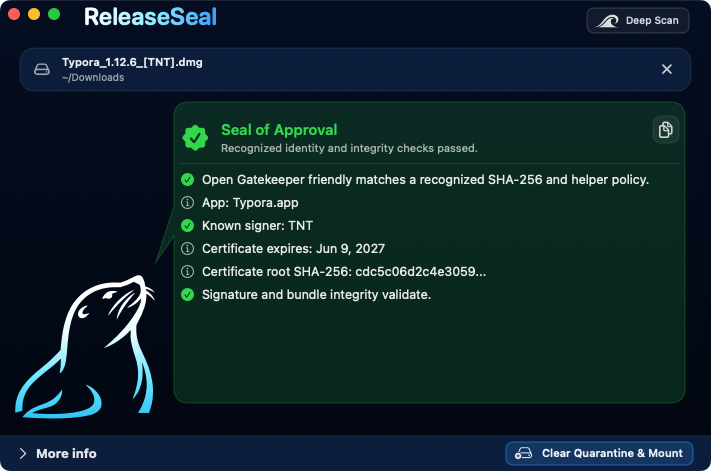
Description
ReleaseSeal is a tool for inspecting DMG, ISO, PKG, ZIP and APP files before opening or installing their contents.
Essentially…
– Who signed the release?
– Does the signer match a known release group or software developer?
– Has anything changed since it was signed?
– Does the exact file match anything known to be compromised?
– Does it contain a malicious Open Gatekeeper friendly binary?
Repacked releases containing stealers and other malware continue to appear. I get asked if something is a “real” TNT, MacKed, etc release far too often… so here we are. ReleaseSeal attempts to provide useful evidence without requiring the user to know macOS Terminal commands, certificate formats or code-signing details.
What ReleaseSeal supports:
– DMG images
– ISO images
– PKG installers
– ZIP archives
– APP bundles
– Nested disk images, including the common TNT-style DMG-inside-a-DMG layout
– Universal 2 | Apple silicon and Intel running macOS 12 or higher
What ReleaseSeal checks:
– Identifies the certificate or signing identity attached to an app, PKG or DMG image.
– Compares signing certificates against a public database of recognized release groups and software developers.
– Checks if signed content still matches what the signer originally sealed.
– Reports individual modified or problematic files when macOS can identify them.
– Checks complete files against known compromised MD5, SHA-1 and SHA-256 hashes.
– Recognizes exact verified release hashes when one has been added to the database.
– Recognizes valid Apple and Mac App Store signatures.
– Confirms whether a recognized “Open Gatekeeper friendly” file matches the expected hash, size and script type.
– Can perform a Deep Scan to show signatures used by executables and other code inside an app bundle.
The database can be reviewed here:
ReleaseSeal evidence database
The four possible scan results:
1. Seal of Approval
Recognized evidence matched. This might be a known release-group signature, an official developer signature, a valid Mac App Store signature or an exact verified file.
This means the available identity and integrity evidence checked out. It does not mean ReleaseSeal performed a complete malware analysis.
2. Seal is broken
Something covered by a signature has changed or failed its integrity check. When possible, ReleaseSeal lists the modified file or files and shows how those internal files are signed.
This does not automatically mean malware. Some groups intentionally patch individual files without signing the complete app again. It does mean the original app-level signature no longer covers everything in its current state.
3. Unknown waters
The file may be correctly signed, ad-hoc signed, unsigned or otherwise intact, but ReleaseSeal does not recognize the identity.
Purple does not mean malicious. It means there is not enough recognized evidence to give it green status.
4. Known Bad Catch
The file or certificate matched reviewed compromised or revoked evidence, or a specifically tracked file appeared in a clearly unexpected form.
Red takes priority over otherwise valid signatures or recognized content.
Deep Scan
Deep Scan examines additional executables and signed components inside app bundles.
This can show situations such as:
– The main app is signed by TNT.
– One patched executable inside it is only ad-hoc signed.
– An internal helper still uses the original software developer’s Apple certificate.
– A modified library is unsigned.
– A nested component has an invalid signature.
Deep Scan provides additional context. It does not automatically turn an otherwise valid recognized outer seal into a warning just because an internal component uses an ad-hoc signature.
PKG support
ReleaseSeal reports the signature and signer attached to a PKG installer, including recognized Apple-issued Developer ID Installer certificates.
Package installers have additional capabilities such as installation scripts and payload instructions. ReleaseSeal does not currently unpack and audit every script or file inside a PKG. A recognized package signer is useful identity evidence, but it is not a complete package-security audit.
When possible, I encourage release groups distributing PKG-based releases to sign the outer DMG containing the package. A recognized DMG signature verifies the complete contents placed inside that disk image.
Quarantine and mounting
ReleaseSeal can remove the macOS quarantine flag from a selected file.
After a DMG/ISO scan, the GUI can offer to clear quarantine and mount the image. Red results or incomplete scans do not receive the mount option.
ReleaseSeal also handles images that are already mounted, nested images and disk images that require a license agreement before macOS will mount them.
GUI and command-line tool
ReleaseSeal includes both a native GUI and a command-line binary. Both use the same checking core, so they follow the same evidence and result logic.
The GUI provides:
– Drag-and-drop scanning
– Result summary
– Expandable detailed output
– Deep Scan
– Copy and export options
– Quarantine removal
– Post-scan mounting
– Saved mounting-confirmation preferences
The command-line version provides:
– Normal and verbose output
– Deep scanning
– Machine-readable JSON output
– Separate exit codes for green, yellow, purple, red and tool errors
– Alternate database loading
– Quarantine handling
– Automation and scripting support
– The –candidate-json option for collecting certificate details to submit new database info
Select:
ReleaseSeal > Install Command Line Tool…
This creates the command-line symlink, after which ReleaseSeal can be run directly with:
releaseseal /path/to/file
The same menu changes to an uninstall option while the symlink is installed.
Currently recognized release and community signers
– Antibiotics / ATB
– aqzs
– Dokdo, Beautiful Island
– LOVE
– MacKed
– QiuChenly
– TEAM EDiSO
– TEAM HCiSO
– TNT, with two known certificates
– SEAL TEAM WORLDWIDE, used to sign ReleaseSeal
Valid Apple-anchored Mac App Store signatures are also recognized without needing every Mac App Store developer certificate added to the database.
Currently recognized official software developers
– Ableton
– Adobe, including current, historical and installer certificates
– AgileBits / 1Password
– Anthropic
– Apple Software Signing
– Blackmagic
– Canva
– Canimaan / ClamXAV
– CharlesSoft / Pacifist
– Cloudflare
– ESET
– Google
– Hex-Rays
– IINA
– Image-Line
– Intuit
– JetBrains
– MacPaw
– Malwarebytes
– Microsoft
– Mothers Ruin / Suspicious Package
– Objective Development
– Objective-See
– The Omni Group
– OpenAI
– Panic
– Parallels
– Proton
– RustDesk
– Sentinel
– Spotify
– Transmission
– Valve
– Vector 35
– VideoLAN
– VMware
Only the exact certificate fingerprints recorded in the database are recognized. Developers periodically renew or replace their certificates, so a newly signed official release may temporarily appear as purple until the new certificate has been reviewed and added. Up-to-date database summary can found here.
What ReleaseSeal is not
ReleaseSeal is not:
– A replacement for common sense
– A full malware scanner
– A guarantee that recognized software is harmless
– A complete PKG script and payload analyzer
– Proof that an unknown or unsigned release is malicious
– Proof that every broken signature is malware-related
The purpose is to report useful identity, integrity and hash evidence in a form that anyone can understand.
A green result means recognized evidence matched. It deliberately does not use words such as “safe” or “malware-free.”
Submitting new evidence
There will be valid release-group and developer certificates I have not yet collected. There are also many compromised files not currently in the database.
If you have a verified release from a signer that should be recognized, the command-line tool can produce a submission-friendly certificate record:
releaseseal –candidate-json /path/to/release
This does not modify the database. It only prints the information needed for review.
Release groups are strongly encouraged to sign their releases. If signing a modified app bundle causes compatibility problems, signing the final outer DMG still provides a verifiable seal around everything distributed inside it.
Trust and source availability
The ReleaseSeal GUI and core source are currently private. This may change as the project develops.
The complete evidence database is public, along with the hashes and signing details for ReleaseSeal itself.
The published database is the one bundled into the GUI and CLI release, 1:1.
I’ve been around for a while. Many of you have used my releases, and some know me outside this forum.
If the current trust model works for you, cool. If it doesn’t, cool.
Notes:
If you would like to double check a file that claims to be from the following cracker then please use this app to do so. Big thanks to Jetfir3 for creating this app, the download is directly from github.
Currently recognized release and community signers
- Antibiotics / ATB
- aqzs
- Dokdo, Beautiful Island
- LOVE
- MacKed
- QiuChenly
- TEAM EDiSO
- TEAM HCiSO
- TNT, with two known certificates
- SEAL TEAM WORLDWIDE, used to sign ReleaseSeal
Download
No comments yet. Be the first to share your thoughts!
Comments & Reviews