ARC: Aspect Ratio & Resize
Information




Description
ARC: Aspect Ratio & Resize is a focused Mac utility for image dimensions.
Aspect ratios, resize previews, batch image workflows, and clean exports.
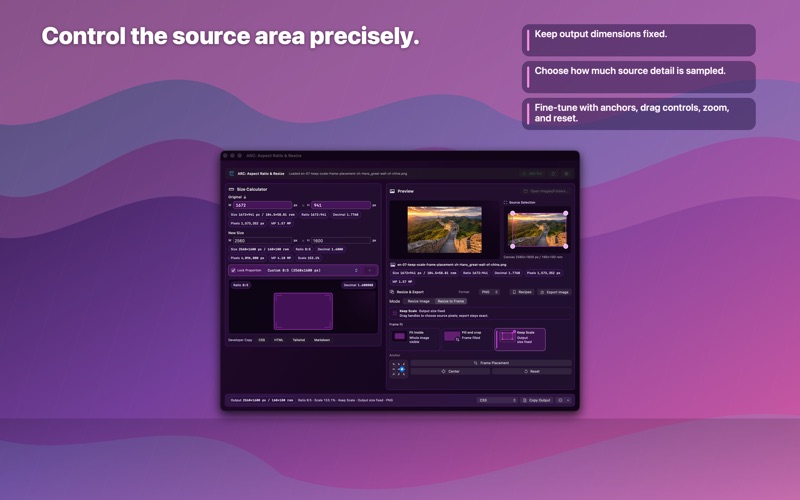
ARC: Aspect Ratio & Resize Enter an original size and a new size, choose a ratio or exact frame, preview the result, then copy developer-friendly output or export finished image assets.
ARC: Aspect Ratio & Resize Use it for web assets, screenshots, social posts, product images, documentation, print-aware handoffs, App Store graphics, real estate marketing, and everyday sizing work.
ARC: Aspect Ratio & Resize What you can do:
– Calculate aspect ratios, decimal ratios, pixel counts, megapixels, and scale.
– Inspect images by dragging, pasting, choosing a file, or using Open With in Finder.
– Open multiple supported images in separate ARC windows for parallel single-image workflows.
– Drop multiple images or folders and choose Batch Workspace or separate windows.
– In Batch Workspace, review the job visually, apply different Export Recipes to different selections, preserve per-image overrides, resolve warnings, choose naming behavior, and export safe copies without modifying originals.
– Resize images to exact dimensions.
– Resize to Frame with Fit Inside, Fill & Crop, and Keep Scale.
– Adjust source placement with anchors, drag controls, zoom, and a larger Frame Placement window.
– Save and reuse Export Recipes for size, frame, format, metadata, and filename settings.
– Export PNG, JPG/JPEG, TIFF, HEIC, and HEIF when supported by macOS.
– Preserve useful export names with source-based filename templates for Save, Share, Copy Image, and Drag Image.
– Copy CSS, HTML, Tailwind, Markdown, rendered image output, and custom Pro templates.
– Organize custom ratios, saved copy formats, and export recipes into categories.
– Use Quick Ratio from the menu bar for fast math, with optional launch at login.
– Choose Follow System, Light, Dark, Blueprint Dark, or branded workspace themes.
Free users get the core calculator, image inspection, built-in copy outputs, and a monthly export allowance. ARC Pro Access unlocks unlimited exports, Batch Workspace export, saved Export Recipes, custom ratios and templates, advanced units, iCloud settings sync, workspace themes, and curated exact-size presets. Choose Annual Pro, Monthly Pro, or Mac Lifetime. Prior paid users keep honored legacy Mac access.
ARC is built for designers, web designers, marketers, developers, creators, and business users who need precise dimensions without opening a full image editor.
Terms: https://aspectratiocalc.com/terms
Privacy: https://aspectratiocalc.com/privacy
Support: https://aspectratiocalc.com/support
What's New
ARC 2.4 introduces a brand-new Batch Workspace, repeatable Export Recipes, smoother Finder workflows, and ARC Pro Access. - Add multiple images or folders, review outputs visually, resolve warnings, choose naming behavior, and export safe copies without modifying originals. - Apply different Export Recipes to different selections inside one batch job—for example, social images in one group and web, email, documentation, or App Store assets in another. - Target edits to the current image, selected images, or the whole batch while keeping per-image overrides visible. - Save, apply, update, duplicate, rename, and delete Export Recipes for reusable size, frame, format, metadata, and filename setups. - Open supported images with ARC from Finder. Open several images in separate ARC windows for parallel single-image work. - Drop multiple images or folders and choose Batch Workspace or separate windows automatically. - ARC Pro Access now offers Annual Pro, Monthly Pro, and Mac Lifetime, while prior paid users retain honored legacy Mac access. - Free users now receive a monthly export allowance. - Settings sizing, Pack browsing, walkthrough controls, StoreKit, privacy, localization, accessibility, and visual polish were also improved.
Download
No comments yet. Be the first to share your thoughts!
Comments & Reviews