Beyond Compare
Beyond Compare is a popular data comparison tool that compares folders, text files, images, and tables.
Information
Description
Beyond Compare is a popular data comparison tool that compares folders, text files, images, and tables.
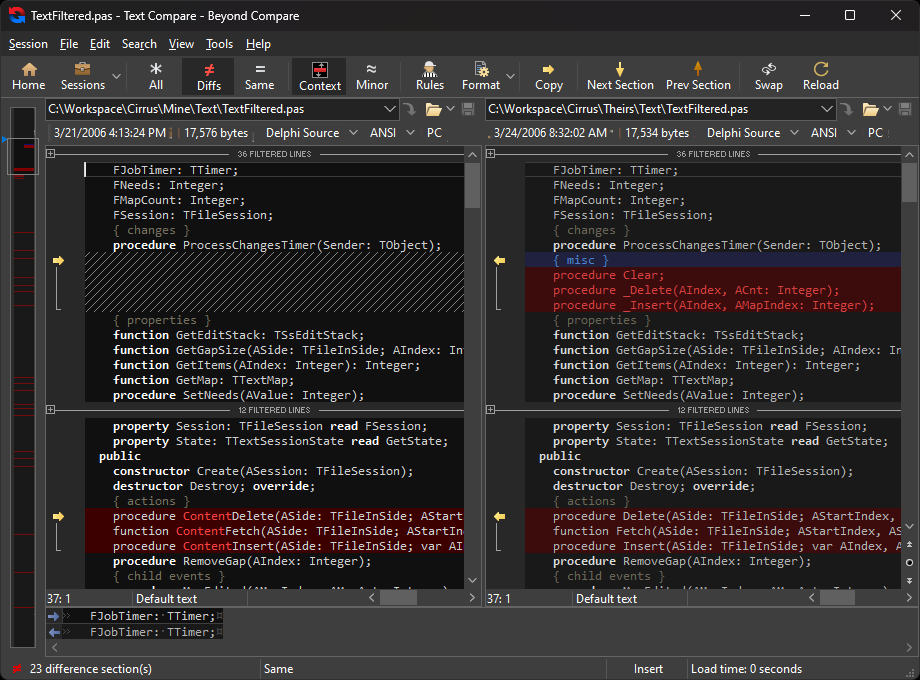
It efficiently reviews differences and allows you to merge changes with confidence. Beyond Compare is a software application for developers, system administrators, and more to compare, merge, and synchronize data for Windows, macOS, and Linux operating systems. It compares files and folders with simple yet powerful commands, focusing on the differences you’re interested in, ignoring those parts you don’t care about.
In addition, it can merge changes from two versions of a file or folder into a single output, and synchronize local data, FTP sites, and cloud storage. The upcoming BC5 version will include new features such as dark theme, text wrapping, and more. Beyond Compare integrates FTP sites, cloud storage, and compressed files, and powerful filters let you see only what interests you. It intelligently chooses the best way to compare and display specific files.
Text files can be viewed and edited with syntax highlighting and comparison rules, and are suitable for documents, source code, and HTML. Data files, executables, binary data, and pictures all have dedicated viewers that allow you to see changes clearly. Beyond Compare’s merge view allows you to merge changes from two versions of a file or folder into a single output, with an intelligent approach that allows you to quickly accept most changes while double-checking for conflicts.
You can use Beyond Compare directly from most version control systems, giving you powerful comparison and merge support when you need it most. Color coding and section highlighting make it simple and easy to accept, reject, or incorporate changes. When merging files, you can use the built-in syntax highlight editor to change any line in the output. Beyond Compare’s intuitive folder sync interface allows you to automatically reconcile differences in your data.
Whether it’s updating your laptop, backing up your computer, or managing your website, Beyond Compare takes care of all the details. You can use the same interface to copy data to disk, FTP server, and compressed files. All content that is not desired to be affected can be easily filtered out, and all powerful comparison techniques are available to make backups fast or robust according to your needs. You can also automate repetitive tasks with a flexible scripting language, and any script can be invoked from the command line, allowing you to schedule synchronization at the most convenient time.
Activation Notes:
5.0.0.29773 has been updated to the official version, and starting from version 5.0, ARM is natively supported
For serial numbers, please delete the first and last whitespace characters
Download
No comments yet. Be the first to share your thoughts!
Comments & Reviews