
DateDrop — Formatted Date/Time
Information


Description
DateDrop is a menu-bar date and time picker for macOS.
Hit the global hotkey, pick a date, time, format, and time zones, and ⌘↩ inserts the formatted string into whichever app was frontmost — your email, your calendar invite, your code, your notes.
WHAT’S INSIDE
• Drops down from the menu bar. Click the calendar icon (or hit the global hotkey, default ⌃⌥⌘D) and the picker appears. Click outside or press Esc and it’s gone.
• Insert anywhere. ⌘↩ types the formatted string into whatever was frontmost — DateDrop never steals focus, so you stay in your draft.
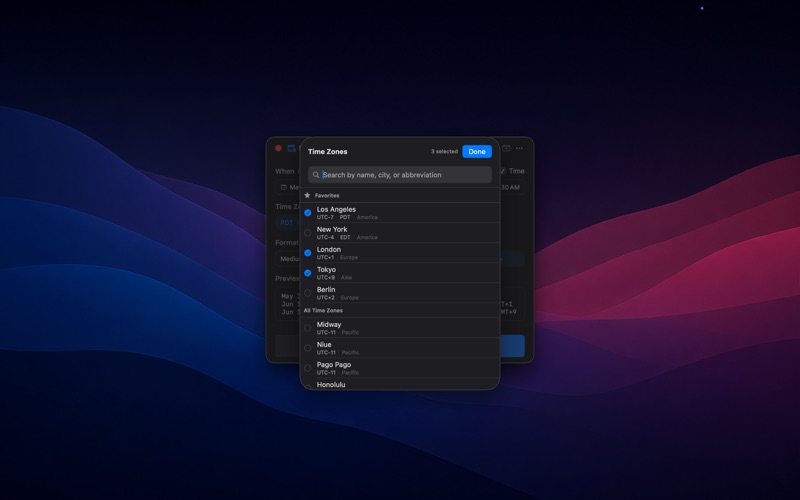
• Multiple time zones. Pick any time zone in the world; DateDrop renders the time in every selected zone at once. Star your favorites so they’re one click away.
• A dozen formats. Long, Medium, Short, Day of Week, Date Only, Time Only, ISO 8601, RFC 2822, Unix Timestamp, plus a Custom field that takes any UTS #35 / DateFormatter pattern.
• Date ranges. Toggle “to” and DateDrop renders a start–end range with each side independently editable.
• Detach as a window. Pin DateDrop as a free-floating window if you’d rather have it open the whole time instead of summoning it.
• Configurable global hotkey. Bind it to whatever combination feels natural — defaults to ⌃⌥⌘D.
• 24-hour clock optional. Toggle once in Preferences; applies to every preset that has a time component.
• Native and sandboxed. Pure SwiftUI + AppKit. No telemetry, no account, no upload-anywhere — DateDrop runs entirely on your Mac.
• Localized. Available in English, Spanish, French, German, Italian, Portuguese (Brazil), Russian, Japanese, Korean, and Simplified Chinese.
WHO IT’S FOR
Anyone who types dates into things all day — engineers stamping log entries, project managers scheduling across zones, writers logging entries, anyone who has ever typed “Tuesday October 14” and then had to look up whether it’s a Tuesday.
What's New
Date order follows your region The Long, Date Only, and Day of Week presets used to render in month-day-year order regardless of the system region — German users saw "März 5, 2026" when their language already said "5. März 2026" everywhere else. The three presets now pick up the active region's natural order: 5. März 2026 in German, 5 March 2026 in British English, 2026年3月5日 in Japanese, 5 de marzo de 2026 in Spanish, and so on. US English is unchanged. ISO 8601 and RFC 2822 stay locked to their respective specs. Polish Bottom padding on the popover and detached window now matches the side padding, so the action bar reads as square inside the frame.
Download
No comments yet. Be the first to share your thoughts!
Comments & Reviews