FigrCollage Pro
Information

Description
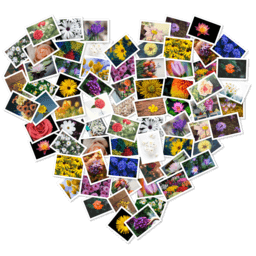
FigrCollage Pro: Best software to make a photo collage in the form of any shape, number, word, or text.
Use your pictures to make a photo collage in heart, circle, square or any other shape. Arrange your photos in the shape of number 1, 2, or any other number. Layout pictures to form any alphabet or word.
FigrCollage Pro SAMPLE USAGE
• Make a collage in the shape of number 1 to celebrate your child’s first birthday.
• Make a “Thank You” or “Happy Birthday” collage by arranging photos to form these words.
• Make a heart shaped collage from your and your partner’s photos as a valentine’s day gift.
FigrCollage Pro FEATURES
• Arrange pictures to form any shape
• Arrange pictures to form any number
• Arrange pictures to form any word or text
• Large number of standard shapes to choose from
• Use your own shapes
• Layout pictures in a freeform photo pile or in a grid of rectangular/hexagonal/circular photos
• Set a background color or use a transparent background
• Select from a wide range of output sizes
• Specify custom output sizes
• Landscape or portrait collages
• Export collage as JPEG, PNG, or TIFF to send it to a print shop or to print it from the local printer
• Export collage to Photos app
• Set collage as Desktop Picture
• Share photo collage on Facebook, Twitter, Flickr, Email, and AirDrop
• Save project to edit later
Download
No comments yet. Be the first to share your thoughts!
Comments & Reviews