
FileJoy Smart Assistant
Information


Description
FileJoy Smart Assistant: A faster way to work with files on your Mac.
FileJoy helps you organize, rename, convert, and clean up files in seconds, straight from the macOS context menu and menu bar.
Local AI on your Mac:
– Smart Rename with context-aware naming suggestions
– Smart Search that finds files by meaning (OCR text, document content, and metadata), not only by filename
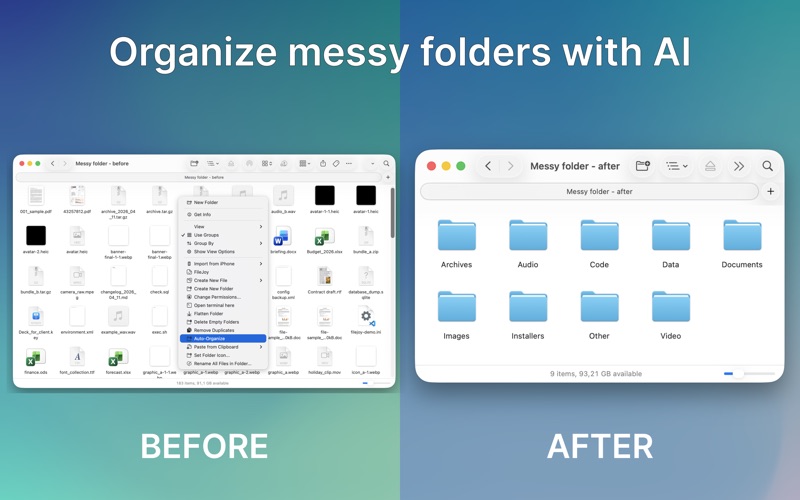
– Auto-Organize for cleaner folder structures
– Private, on-device processing with Apple Foundation Models (when available and enabled), plus OCR + Vision fallback
No cloud upload. Your files stay on your Mac.
Batch file tools:
– Convert images: JPG, PNG, HEIC, WebP
– Convert images to PDF (single or multiple files)
– Compress, resize, and watermark images
– Remove metadata
– Convert audio: MP3, WAV, M4A
– Extract audio from video
– Convert video to MP3
– Convert video to GIF
PDF and OCR tools:
– Merge PDF files
– Split PDF files
– Compress PDFs
– Extract text from images and documents with OCR
– Copy text in one click
Folder cleanup and organization:
– Remove duplicates
– Delete empty folders
– Flatten nested folders
– Batch rename files in folders
Everyday file tools:
– Cut / Paste
– Send to / Copy to
– Create files from templates
– Change file and folder permissions
– Open Terminal, iTerm2, or Warp
– Copy file paths
– Paste clipboard content as .txt or .png
Great for people moving from Windows to macOS.
Automation (PRO):
– Action presets for multi-step workflows
– Auto-Organize at scale
– Advanced folder operations
– Custom file templates
– Extended local AI workflows
Free vs PRO:
– Free: core conversion, PDF/OCR, batch rename, file tools, built-in templates, and preview mode for selected folder actions
– PRO: full execution of advanced folder actions, presets, custom templates, and expanded local AI capabilities
Who is FileJoy for?
– macOS users who want faster file workflows
– Developers, designers, and creators
– Anyone working with large file batches
Save hours every week.
Download
No comments yet. Be the first to share your thoughts!
Comments & Reviews