Notchorious
Information




Description
Notchorious turns the notch on your Mac.
Into a customizable panel that appears when you need it and stays out of the way when you don’t.
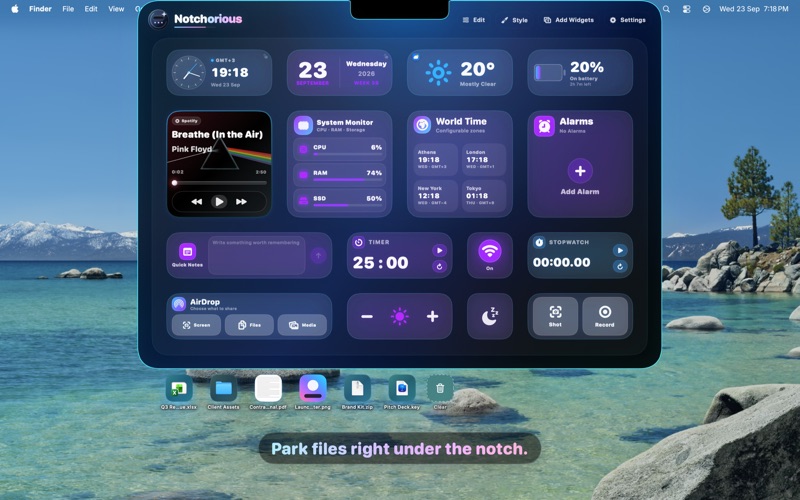
Move your pointer to the top of the screen and your widgets are there. Move away and the panel disappears.
DROP SHELF
Drag files onto the notch to keep them close, then drag them out into any app whenever you need them.
WIDGETS
Time — Clock, World Clock, Calendar, Alarms, Timer and Stopwatch
Productivity — Quick Notes that save to Apple Notes, a To-do list backed by Reminders, and Clipboard History
Media — Now Playing with artwork and controls for Apple Music and Spotify
Weather — Current conditions and a six-day forecast from Apple Weather
Controls — Volume, Brightness, Keyboard Brightness, Wi-Fi and Sleep
System — Battery for your Mac and connected accessories, plus a System Monitor for CPU, memory and storage
Files — Screenshots, screen recordings and AirDrop sharing
MAKE IT YOURS
Arrange widgets freely on your canvas, choose their sizes and customize the look in Appearance Studio.
Choose from six themes: Depth Crystal, Nebula Aura, Terminal, Neon Clear, Comic Pop and Liquid Glass.
WORKS YOUR WAY
Notchorious works on Mac computers with or without a notch, supports external displays and lets you choose how it behaves over fullscreen apps.
Permissions are requested only when a feature actually needs them.
PRIVATE BY DESIGN
No accounts. No ads. No analytics. No tracking. Your data stays on your Mac.
TRY IT FREE
Everything is unlocked for 7 days. After that, unlock Notchorious forever with a single Lifetime Unlock — no subscription.
Weather conditions and forecasts remain available without an unlock.
Requires macOS 14 or later. Liquid Glass requires macOS 26.
Download
No comments yet. Be the first to share your thoughts!
Comments & Reviews