
PastePaw – Clipboard History
Information


Description
PastePaw is a multi-themed, privacy-first clipboard history manager for macOS.
**29 Stunning Themes**
– 18 themes in horizontal card layout: Default, Cyberpunk, Hacker Terminal, Liquid Glass, Wabi-sabi, Classic Mac, Linear, Glassmorphism, Pixel Art, Steampunk, Brutalism, Skeuomorphic, Frutiger Aero, Sanriocore, Y2K Chrome, Coquette, Fairycore, and Decora
– 11 themes in a slim vertical column that docks to your screen edge or follows your cursor like a context menu: Default, Cyberpunk, Hacker Terminal, Liquid Glass, Linear, Pixel Art, Classic Mac, Coquette, Decora, and the vertical-only Editorial Neon and Frost
– Pin the vertical column so it stays put when you click outside, and drag it freely by the header
– Switch layouts and themes anytime to match your mood, your workflow, or your screen
**Clipboard History**
– Automatically saves everything you copy — text, images, files, and folders
– Tracks which app each clip came from, with app icon display
– Smart duplicate detection so your history stays clean
– Configurable history limits: 100, 500, 1,000, or unlimited items
– Auto-delete old clips after 7, 30, or 90 days — or keep them forever
**Powerful Preview Tools**
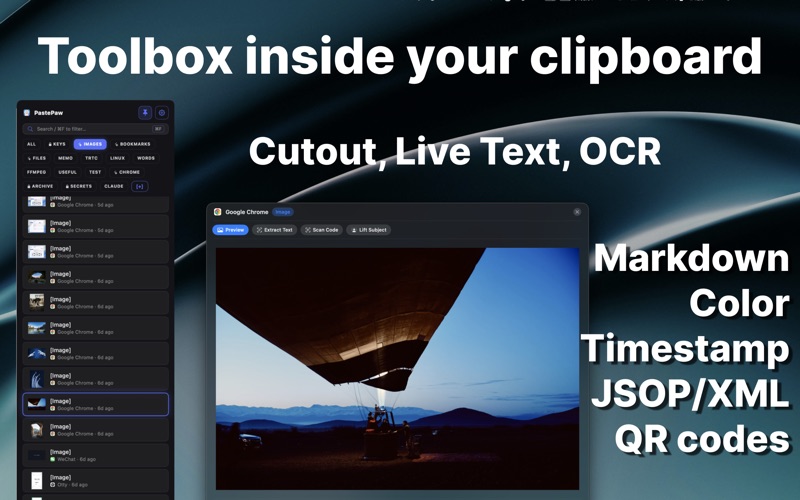
– Press Space to preview any clip — and get tools tailored to what it is
– Markdown & code: full GitHub-Flavored Markdown with syntax-highlighted code blocks and clickable links
– Images: extract text (OCR), Live Text, scan QR & barcodes, and lift the subject
– Text: color preview, timestamp & number-base conversion, XML formatting, and QR generation
**Clipboard MCP Server**
– Your AI agent finally sees what you actually copied — a local MCP server, running on your Mac
– Grant capabilities one by one: reading, searching, saving, filing into collections
– Scope any agent to a single collection, and keep secure collections invisible to all of them
– Nothing is uploaded — the agent talks to PastePaw on your machine, not to a server
**AI-Powered Actions**
– Summarize, translate, explain code, or fix grammar — right from the context menu
– Create unlimited custom AI actions with your own prompts and SF Symbol icons
**Smart Organization**
– Create collections to organize your clips
– Drag and drop clips between collections — including images and files
– Full-text search to instantly find any clip
– Cmd+F to jump to the search bar
**Quick Access**
– Global hotkey (default: Cmd+Shift+V) to open PastePaw from anywhere
– Double-click any clip to paste it instantly
– Floating panel that never steals focus from your active app
– Keyboard navigation with arrow keys, Enter to paste, Delete to remove
**Multi-Select & Preview**
– Cmd+click to select multiple clips, then paste them all at once
– Press Space to quickly preview any clip with live sync
**Auto-Paste**
– Select any clip and PastePaw types it directly into your previous app — no manual Cmd+V needed
**Privacy First**
– All data stored locally on your Mac — nothing leaves your device
– Sandboxed for maximum security
– Ignore specific apps from clipboard monitoring
CONTACT US:
Terms of Use: https://pastepaw.com/terms
Learn more at pastepaw.com
Support: https://pastepaw.com/support
Download
No comments yet. Be the first to share your thoughts!
Comments & Reviews