PastePlop — Clipboard Grid
Information

Description
PastePlop is a native macOS clipboard manager that turns Cmd-Shift-V into a fast.
Visual way to find and reuse anything you’ve copied — text, images, screenshots, files.
ONE HOTKEY, EVERYTHING YOU’VE COPIED
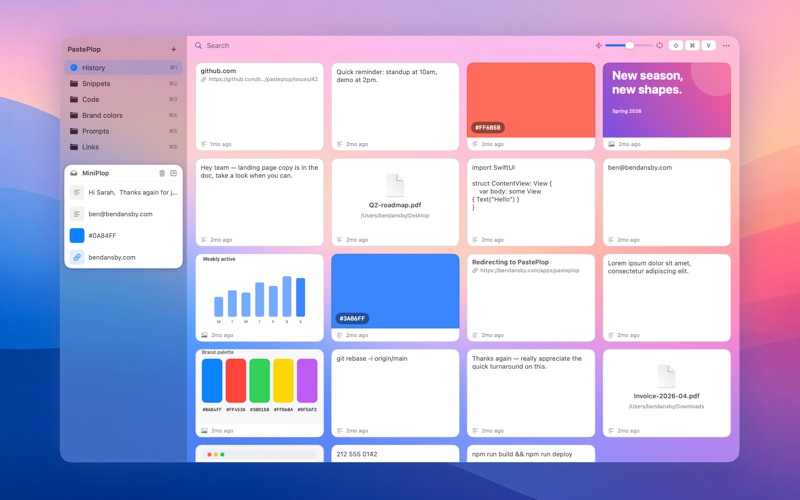
Press Cmd-Shift-V from any app and a translucent grid of every recent clip zooms over your screen. Click a tile to copy it back to your clipboard, then press Cmd-V to paste it wherever you like. Or drag a tile straight into any app. Press Esc to dismiss.
CATEGORIES THAT STICK AROUND
Right-click or drag a tile into a category — snippets, prompts, email signatures, lookup links, anything you re-use. Number-key access: Cmd-1 is History, Cmd-2 through Cmd-9 are your saved categories. Drag to reorder.
MINIPLOP — A FLOATING SCRATCH TRAY
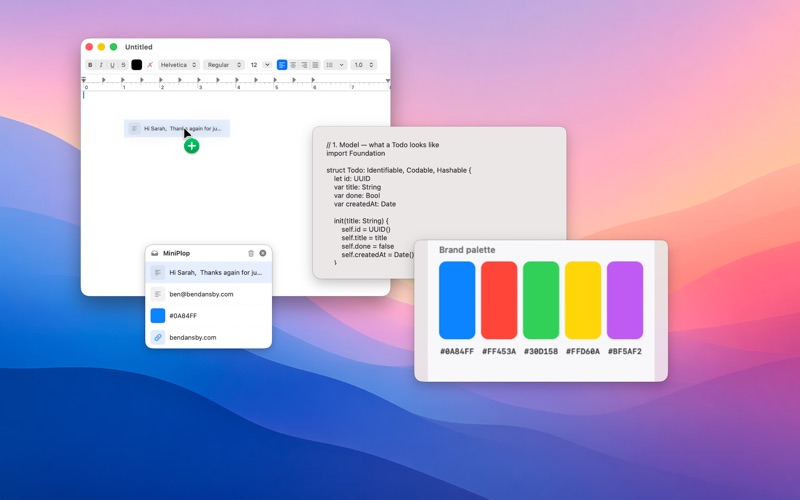
Pop out a small always-on-top tray. Drop in tiles, files, text clippings, images, or links. Click a chip to copy it, or drag it straight out into any app that takes the content.
SEARCH INSIDE IMAGES
Screenshots get OCR’d locally via Apple’s Vision framework, so a search for a phrase you remember seeing on screen finds the screenshot it appeared in. The image and the recognized text never leave your Mac.
PEEK WITHOUT LEAVING THE GRID
Press Space to expand the selected tile to fill the window — images render large, text stays full and selectable, rich text keeps its formatting. Arrow keys flip through items while expanded; Space or Esc collapses it.
TEXT, IMAGES, AND FILES
PastePlop captures plain text, rich text, screenshots, copied PNGs, JPEGs, and GIFs (animated GIFs stay animated), and files copied from Finder. Drag any tile out into another app, or onto a Finder window to drop it as a real file.
KEYBOARD-FIRST
Arrow keys to move, Return to copy the highlighted tile, Space to Peek, Delete to remove. Cmd-F focuses search. Type any printable character to start filtering instantly.
RESIZE TO TASTE
A size slider in the overlay scales every tile from compact to comfortable. Fit more on screen at a glance, or read more of each clip without opening it.
SMALL, FAST, NATIVE
Pure SwiftUI + AppKit. Tiny binary, instant launch, no background services beyond the clipboard watcher. Localized into 11 languages.
PRIVACY
PastePlop runs entirely on your Mac. Your clipboard never leaves the device. No accounts, no telemetry, no analytics, no tracking. The only outbound network traffic is fetching a link preview when you copy a URL — nothing else.
REQUIREMENTS
– macOS 13 (Ventura) or later
– No special permissions: PastePlop copies the clip you pick to the clipboard, and you paste it yourself with Cmd-V.
Download
No comments yet. Be the first to share your thoughts!
Comments & Reviews