
PathBridge
Information

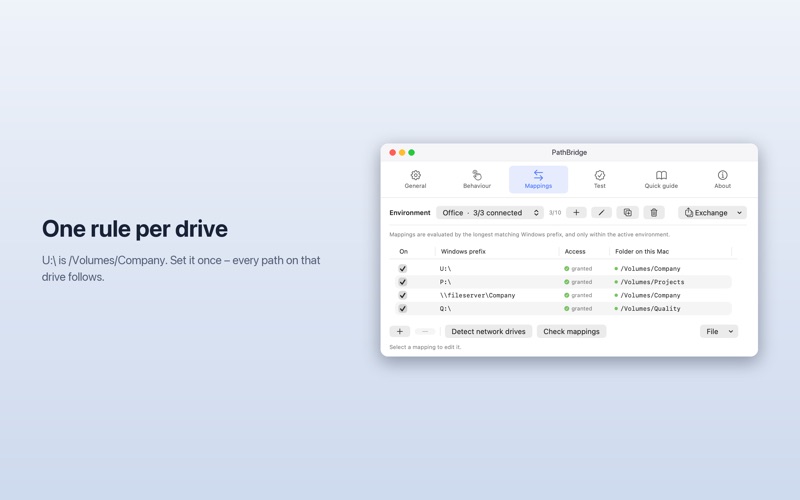


Description
PathBridge opens Windows paths on the Mac.
In mixed offices, colleagues send paths in Windows notation – in e-mails, Teams messages, Word documents and PDFs:
U:Projects202626-045Quote.pdf
On the Mac that is not a link, just text. The same file lives at /Volumes/Company/Projects/2026/26-045/Quote.pdf. PathBridge translates between the two.
Set up one rule – U: is /Volumes/Company – and from then on every path on that drive is one step away from its file. It works in both directions: copy a Mac path as a Windows path and send it back.
FOUR WAYS IN
• Services menu: select a path in any app, right-click, “PathBridge: Open Windows path”. In the Finder, right-click a file to copy its path in Windows notation.
• Clipboard: when you switch it on, PathBridge notices a copied Windows path and offers to open it. Off by default.
• Keyboard shortcuts (Pro): copy a path, press ⌃⌥⌘O. ⌃⌥⌘W turns a Mac path into a Windows path.
• winpath:// links (Pro): clickable links for the paths you send yourself.
UNDERSTANDS WHAT COMES OUT OF E-MAILS
Paths wrapped over two lines, %20 encoding, quotes and brackets, UNC notation (\servershare), file:/// URLs, and text after the path – “U:QuotesQuote.pdf please check today” still opens the PDF. With Pro, a text holding several paths gives you a list, and a path whose capitals or accents came out differently is matched against the folders that actually exist.
NETWORK DRIVES (PRO)
If a drive is not connected, PathBridge connects it instead of showing an error. It notices when a drive drops – usually because the VPN is down – and tells you once, with a button to reconnect.
ENVIRONMENTS (PRO)
Up to ten named rule sets – office, home, VPN – switchable from the menu bar, and optionally automatically when the drives of one disappear and those of another are there.
SAFE BY DESIGN
A path from someone else’s e-mail is someone else’s input. Before opening an app, an installer or a script, PathBridge asks, and offers “Show in Finder” instead. It runs in Apple’s App Sandbox and reaches only the drives and folders you hand it yourself.
PRIVATE
No account, no analytics, no server. Nothing leaves your Mac.
LITE AND PRO
PathBridge is free, with one environment and two rules. PathBridge Pro is a single in-app purchase – no subscription – and unlocks unlimited rules, up to ten environments, keyboard shortcuts, all clipboard modes, UNC and winpath:// notation, several files at once in the Finder, network drive monitoring, history, Quick Look, the list for several paths and spelling correction against the file system. Your rules and settings carry straight over.
In 15 languages. For macOS 14 Sonoma or later, on Apple silicon and Intel.
What's New
• PathBridge now asks for a rating once, after it has proven useful – at most once per version, and only through Apple's own dialog. You can also rate it any time from the menu or the About tab. • When a network drive is missing, the menu bar icon keeps its shape and shows a small warning badge, so PathBridge is always easy to find. • "Connect the missing ones" no longer lingers after the last rule for a drive has been deleted or switched off. • The Help buttons in the About tab wrap to a second line in languages with longer labels instead of being cut off.
Download
No comments yet. Be the first to share your thoughts!
Comments & Reviews