
Prompt 3
Prompt is the terminal that goes where you do, whether you're on the road or at your desk. With Panic Sync, your servers are available.
Information
Description
Prompt 3 is the terminal that goes where you do, whether you’re on the road or at your desk.
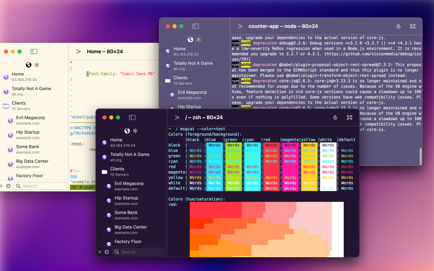
With Panic Sync, your servers are available on your iPhone, iPad, and Mac. With Mosh and Eternal Terminal support, you can stay connected even on the most unstable networks. And with both local terminals and remote connections on the Mac, Prompt is the SSH app that does it all.
Welcome to Prompt 3. For over a decade, Prompt has been the best SSH terminal on iOS and iPadOS, and we’re excited to finally release a much-requested Mac version. But that’s not all. With two new connection types, port forwarding, and a faster terminal, Prompt is better than ever.
• Superfast SSH
We retooled the text engine in Prompt 3 to be up to 10x faster, and with improved terminal emulation, you can run nvim inside tmux without breaking a sweat.
• Clips
Put your most-used commands and text bits into clips and access them with a single tap via Prompt’s keyboard bar. Clips can be stored globally or per-server.
• Secure Enclave
Authenticate with FaceID and TouchID. The keys will stay secure on your device.
• Panic Sync
Sync your favorite servers, passwords, private keys, and clips, between Prompt on all of your iOS devices.
• Customizable
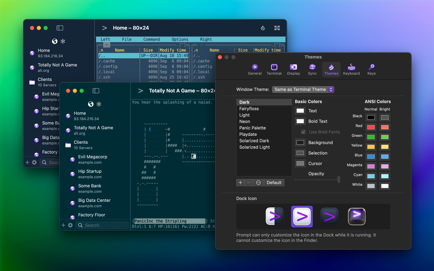
Make Prompt perfect with new themes, fonts, and a very configurable iOS keyboard.
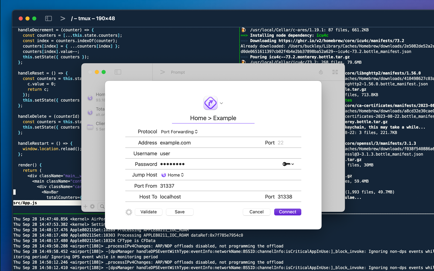
• Jump Hosts and Agent Forwarding
Access corporate servers, even at the beach.
• Mosh and Eternal Terminal
Keep your terminal open, even when you get disconnected. Mosh is optimized for high-latency, low-throughput networks. Eternal Terminal is great for when you need to keep your full terminal history on a flaky connection.
• Mouse Support
Use your mouse to interact with TUI-based apps that run through the terminal.
AND YES, A DARK ICON. What more can we say?
TAKE CONTROL FROM ANYWHERE, NOW INCLUDING YOUR MAC.
WE HOPE YOU ENJOY PROMPT 3.
See Panic’s Privacy Policy and Terms here:
And the Prompt EULA here:
https://www.apple.com/legal/internet-services/itunes/dev/stdeula/
Notes:
Local terminals don't work from the external package from Panic.
Use this method instead if you need them:
1. Download, run once, then paste this command in the terminal:
defaults write com.panic.prompt.3 editors.bookmarkData -data 950ab8958c366758b8b972dba4f744c238e1a8f6d9d602fae90241e694feafd6469c9c6dfac54a5a0bea9976b004bd9540b301dcc539312a07908c4e0b521a7340d77d0db3860838aaf6e72a33991254a15d1674ea654a9b7f18eeeac5f21c6ebb66f938d9f5f58b9ee774e939d5f860e29fcf407a5458d2e0b7b476b25eb71d693e5c9b8390947a0c1cc40514b3c21bcee3a77257ce10e22ca5c0e24e7490de1a9acbd84e728592ffa4504b8b0e9092c368ac0f27da0b83d76ce759ebda707f085946d2f29f12162768a2e939c7c0452f737c8ff01117f9e8cc2d1625fb586945965f97e83c1fedb57039e5971912107fb0f6fb3f8c6f73960a846c43b96734cbb218521e8e7b7915fdd3d07993e38d1106f1b58cd4070babc493eecad6fe4b6fd8d3b3c735ede6f8989a3a55c0fa62dbe89af9915e5034fb3df9370eeb6ff6e3bef1c87b6b76a338535ff7b9b6d1aad84e9d0fa9d6f93b955f802505ebda1c8194a07bd056bae441dac96a0744f7296d67272d051b5e568260c9c1f149e4100940bd2b765650d204093c23244105cf854e2a8fe26b4afe5ca5bfd355f405c37999288f50b5c614495c7229bf957b16311cde7ab3ead95c7cc1fddcf654d8895ea9589d9bc128cebae6f7faea2e362eedd4aa594a4358f4043f7d46e65aef4a386bb1e61f3c65c99e408174a1daad142. Block outgoing connections to circle.panic.com
Download
No comments yet. Be the first to share your thoughts!
Comments & Reviews