StyleBop – Visual CSS editor
Information



Description
StyleBop is a visual editor for CSS files.
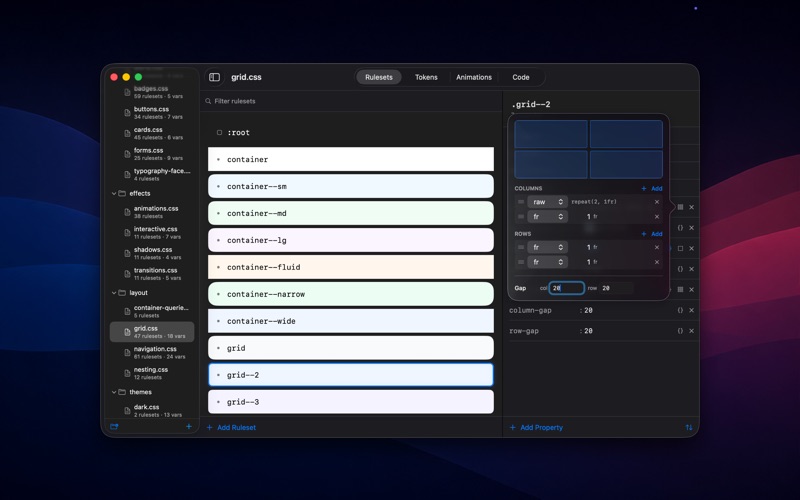
Open a folder, get a clean canvas of every ruleset, edit colors and gradients with real pickers, build keyframe animations on a timeline, and manage design tokens across files.
It writes plain CSS to disk. No proprietary format, no build step, no lock-in. Open the same folder in any other editor and the diffs are clean.
What’s inside
• Rulesets canvas — every CSS selector becomes a node you can click into. Edit properties with type-aware popovers: color picker, gradient builder, box-shadow stack, cubic-bezier curve editor, grid template, filter chain.
• Tokens tab — your :root custom properties and @font-face families in one place. Each variable has a usage tracker that shows every file and ruleset that consumes it. “0 references — safe to delete” so dead tokens stop accumulating.
• Animations tab — keyframe timeline with draggable stops, live preview running on the canvas, cubic-bezier curve editor.
• Code tab — full text view with autocompletion, smart typing (paste a hex on a color: line and it just works), and project-wide find/replace.
• Extract to Variable — pick any literal value, hit a shortcut, and StyleBop rewrites every matching occurrence across the entire project to var(–name). Suggested names use a curated palette so #6495ED becomes –color-cornflower instead of –color-6495ed.
Modern CSS
@layer cascade layers, @container container queries, @supports feature queries, @media wrappers, CSS nesting, @keyframes, @font-face — all parsed as first-class constructs and round-tripped byte-perfect on save.
Tailwind v4
@theme blocks are recognized as design-token surfaces. Tailwind-style files get Tailwind-style suggestions on Extract to Variable (–color-blue-500 instead of –color-cornflower), and new tokens land inside the existing @theme block.
StyleBop Localized
UI in eleven languages: English, Spanish, French, German, Italian, Brazilian Portuguese, Japanese, Korean, Ukrainian, Russian, Simplified Chinese.
Editor integrations
Right-click any CSS file in VS Code or a JetBrains IDE and pick “Open in StyleBop” — the app launches and lands on the construct your cursor was on. Free companion extensions on the VS Code Marketplace and JetBrains Marketplace.
Download
No comments yet. Be the first to share your thoughts!
Comments & Reviews