
SwiftStrip – App Launcher
Information




Description
SwiftStrip – App Launcher: After years of searching for the perfect dock launcher.
One that could replace that almost perfect app many of us loved before it was discontinued – I decided to build it myself.
SwiftStrip is a modern dock launcher for macOS that brings back the joy of organizing your apps, files, and folders exactly the way you want. No rigid grids. No forced workflows. Just flexible, floating docks that stay out of your way until you need them.
What makes SwiftStrip different?
It’s simple when you want it simple, and powerful when you need more. Create as many docks as you like, organize them with tabs, customize every visual detail, and place them anywhere on your screen. SwiftStrip remembers everything – positions, sizes, contents – so your workspace is always ready.
Core Features
• Multiple floating docks that stay on top of your windows
• Tabs for organizing apps, files, and folders into categories
• Drag and drop from Finder – just drop what you need
• Click to launch, ⌘-click to reveal in Finder, ⌥-click to hide running apps
• Resizable grid that snaps intelligently
• Running app indicators so you always know what’s open
• Spring-loaded folders – hover or hold to peek inside
Make It Yours
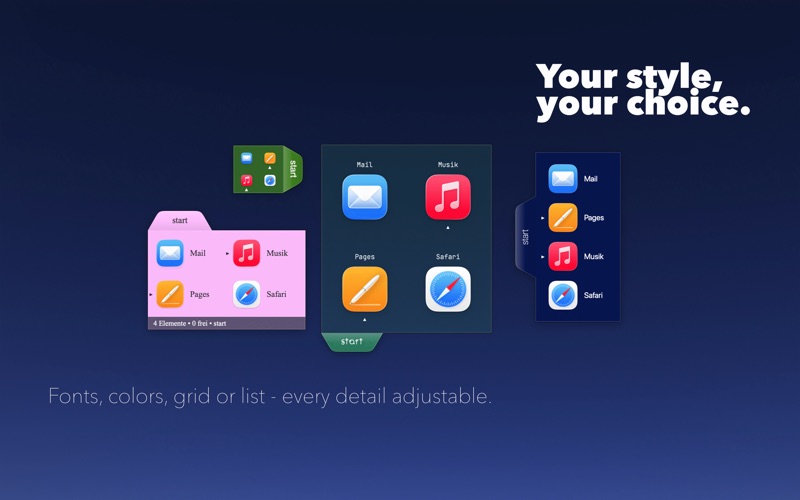
Every dock can look different. Adjust icon sizes from tiny to large. Position labels above, below, left, right – or hide them completely. Choose colors for each tab. Set opacity levels. Configure spacing and padding. Pick from horizontal or vertical layouts. The status bar shows your item count and current tab, and yes, you can customize that too.
Auto-Hide Options
Three ways to keep your docks out of the way:
• Slide off-screen and reveal on hover
• Fade to near-invisible until you need them
• Hide completely and reappear when your mouse approaches
Configure delays, choose slide directions, even keep just the tabs visible while the content hides.
Watch Folder:
Turn any tab into a live view of a folder’s contents.
Keyboard-Friendly
⌘1 through ⌘9 switches tabs instantly. ⌘T creates a new tab. Everything feels native because it is.
Smart Details
Network volumes that get disconnected? SwiftStrip shows them dimmed with a badge, and you can remount directly from the spring-loaded menu. Moved a file? SwiftStrip helps you find it again. The app respects your Mac, using minimal resources and saving your configuration automatically.
Try Everything Free for 30 Days
When you first launch SwiftStrip, all Pro features are unlocked for a full month. No credit card needed, no commitment. Just explore everything the app can do.
Free Forever, Pro When You’re Ready
After your trial, SwiftStrip remains completely usable. Create docks, add items, customize appearances – the core experience is always free.
Pro features require either:
• A monthly or yearly subscription
• A one-time lifetime purchase
What’s Included in Pro
• Auto-hide with three modes and customisable delays
• Always on top – docks stay visible above all windows
• Bring to front on drag – docks appear when you’re dragging files
• Spring-loaded folders with adjustable timing
• Watch Folder Tabs
• Process Docks
• Mouse-over tab switching
• Tab keyboard shortcuts (⌘1-⌘9)
• Advanced appearance options
Built by Someone Who Uses It
SwiftStrip isn’t designed by committee or built to check feature boxes. It’s made by someone who missed having a proper dock launcher and wanted to bring that experience to modern macOS. Every feature exists because it’s useful, not because it looks good on a list.
Give it a try. Your desktop will thank you.
Privacy Policy: https://asv.pt/earthbeat-privacy-policy/
Terms of Use: https://www.apple.com/legal/internet-services/itunes/dev/stdeula/
Download
No comments yet. Be the first to share your thoughts!
Comments & Reviews