
TabBar for Office – File Tabs
Information


Description
TabBar for Office – File Tabs: Open Word, Excel and PowerPoint on a Mac and count the windows.
A contract and its two revisions. The model, the raw export, last quarter’s figures to check a number against. The deck you are borrowing a layout from. Every one of them is a separate window, and the only thing that lists them is a Window menu you have to open, read and choose from — once per application.
TabBar for Office puts a row of tabs above whichever Office application you are in. One tab per open file. One click to switch.
THE SAME BAR, THREE APPLICATIONS
It follows you. Work in Word and the bar lists your documents; move to Excel and it lists your workbooks; move to PowerPoint and it lists your presentations. One item in the menu bar rather than three, and one row wherever you are.
IN THE BAR
– One tab per open document, workbook or presentation
– Click a tab to bring that file forward
– The current file’s tab is marked
– The bar follows the front Office window and stays anchored above it
– Drag the right edge to set its width; each application remembers its own
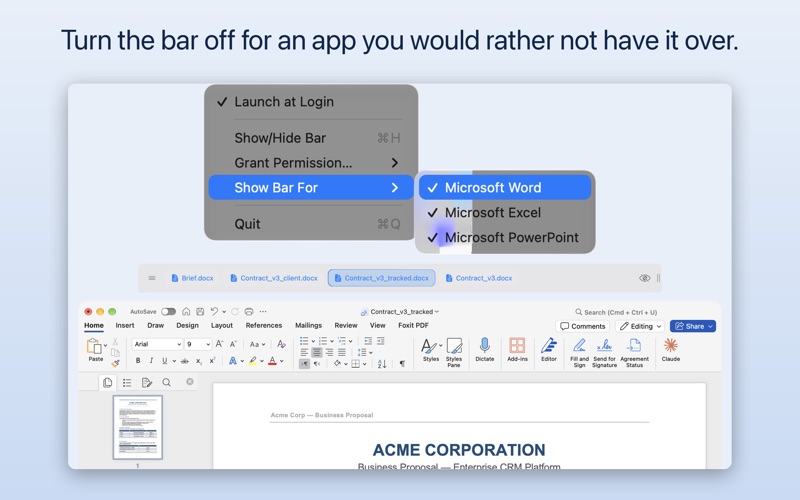
– Switch the bar off for an application you would rather not have it over
– ⌘H hides it and brings it back
IN THE MENU BAR
TabBar for Office runs from the menu bar: no Dock icon, no window of its own, nothing added to Word, Excel or PowerPoint themselves. Launch at login is optional. The interface is English, German, Spanish and Hebrew, with right-to-left layout where it applies.
ONE PURCHASE, NOTHING ELSE
TabBar for Office is bought once. There is no subscription, no account, nothing to buy inside it, and no limit on how many files it will show you.
If you already have TabBar for Word, this update is free and adds Excel and PowerPoint to it.
TabBar for Office ONE-TIME SETUP
The first run asks for permission to talk to the Office applications you use, once each. Switching PowerPoint presentations works on files that have been saved: a new deck you have not saved yet appears in the bar but cannot be brought forward until it has a file.
WHAT IT DOES NOT TOUCH
It reads the names of the files you have open and brings the one you clicked to the front. It does not open your files, read a line of their contents, change them, or send anything anywhere. No account, no sign-in.
Requires macOS 13 or later and Microsoft Word, Excel or PowerPoint.
What's New
TabBar for Word is now TabBar for Office, and it handles Excel and PowerPoint as well as Word. The name and the icon on your Mac change with this update; nothing about how you use it does. Your purchase carries over and now covers all three applications. Also in this version: the marked tab follows whichever file is in front, however you switched to it — before, it marked only the tab you had last clicked in the bar. A new Show Bar For menu turns the bar off for an application you would rather not have it over. And setting the helper up now asks once rather than once per application.
Download
No comments yet. Be the first to share your thoughts!
Comments & Reviews