Unclutter
Unclutter is a 3-in-1 productivity app to power up your efficiency and comfort on Mac during the day.
Information
Description
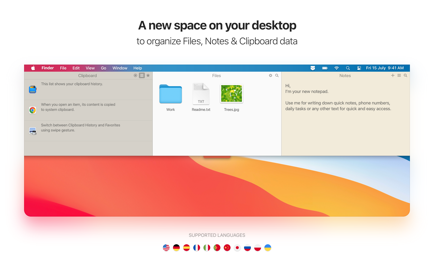
A new space on your desktop
to organize your Files, Notes and Clipboard data
Unclutter is a 3-in-1 productivity app to power up your efficiency and comfort on Mac during the day.
It’s a smart and super handy place on your desktop for storing notes, files and pasteboard clips.
Being just one easy gesture away, Unclutter becomes a surprisingly helpful and convenient tool. In fact 3 tools:
*** Clipboard History ***
Track everything you copy into your Mac’s clipboard. You can browse the list of recent clips & recall any of them.
*** Quick Notes ***
Jot down casual notes without launching a text editor. You can find any note with a keyword, using the full-text search.
*** Files Hub ***
Now you have a place to drop casual files to, without cluttering your Desktop or wasting time on searching for them.
HOW IT WORKS:
– Unclutter stays hidden above your Desktop and opens instantly when you need it. All your data is always with you, nicely stored and neatly organized.
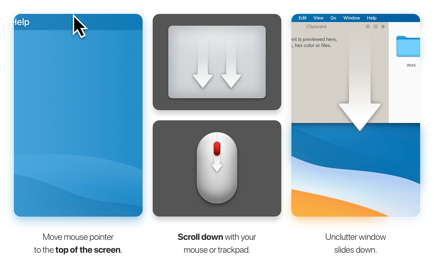
– To open, simply move the pointer to the very top of screen and scroll down. That easy!
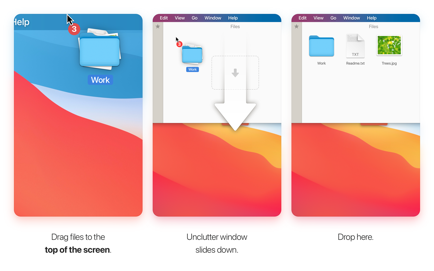
– Drag items from Desktop or other applications to the top of screen to store them in Unclutter.
MAIN FEATURES:
– Instant access to your data on every screen and space of your Mac, even in full screen mode.
– Draggable panels that can stick on top of other windows
– Files and notes can auto-sync across all your Macs via iCloud Drive or Dropbox
– Full retina & multi-display support
– Universal Clipboard support
– Light/Dark theme to match system appearance.
WE LOVE TO HEAR FROM YOU
Have a question? Want to request a feature or share your idea?
Please contact us at [email protected]
Twitter – https://twitter.com/Unclutterapp
Facebook – https://www.facebook.com/Unclutter
Download
No comments yet. Be the first to share your thoughts!
Comments & Reviews