
MouseBoost Pro
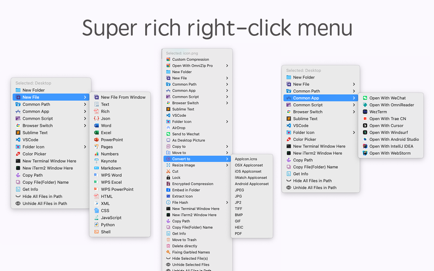
"MouseBoost Pro" packs over 30 handy utilities. With a right-click, you can access various features to boost your productivity.
Information
Description
“MouseBoost Pro” packs over 30 handy utilities. With a right-click, you can access various features to boost your productivity.
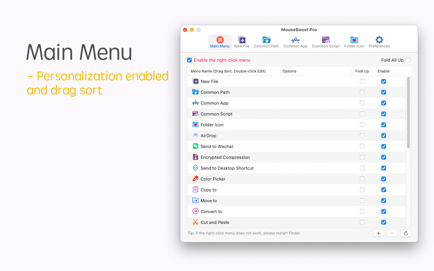
Personalize the right-click menu for your needs, whether you’re a programmer, designer, or other. As a Mac user, this tool is a must-have.
***MouseBoost Pro Key Features***
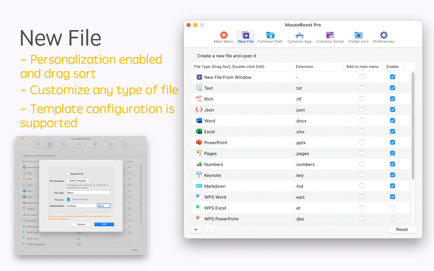
– File Creation: Quickly create custom files, including special types like .gitignore.
– Common Paths: Organize and quickly access your most-used directories and their sub-files.
– App Shortcuts: Streamline your workflow by adding frequently used apps to the right-click menu.
– Script Runner: Add custom scripts for tasks like file operations, enhancing efficiency.
– Hide/Show Files: Conceal private files for privacy or clean screenshots.
– File Locking: Secure files against accidental changes with a click.
– Color Picker: Snap and copy HEX/RGB values from your screen.
– File Management: Move, copy, and manage files with ease.
– Terminal Access: Open Terminal or iTerm2 directly in the desired directory.
– Folder Icons: Personalize folder icons with various styles.
– Image Tools: Generate icons for multiple platforms and convert image formats.
– File Info: Obtain cryptographic hashes and other info for files.
– Send Files: Share files via air-drop or to WeChat.
– Advanced Features: Copy paths, force-delete files, and more.
– Customization: Arrange the menu, disable unused options, and add preferred apps/files for a tailored experience.
For a small cost, enhance your work speed. Don’t wait, get it now for instant benefits!
Troubleshooting:
– iTerm2 dual windows: Adjust preferences to restore only the hotkey window.
– Right-click issues: Restart Finder, toggle the MouseBoost extension, or adjust iCloud settings for macOS 14.
Reach us at [email protected] for support.
This version of Mouseboost 4.3.2 does not work on my macOS Tahoe 26.4, MacBook M2. Immediately after the first start I have the hint in the program window, that the version used here is “pirated” and that I should get the official version from the App Store instead. The “authorize” offered by the program window has no effect, followed by annoying windows that force me to quit the app (the same with mouseboost-versions before it).