
Warden
Information
Description
Warden: Lock the input. Not the screen.
Not a lock screen — your display stays on, your apps
keep running. Warden only blocks input.
Unlock instantly with Touch ID.
When you need Warden
AI Agents
Claude Code running a 45-minute refactor. One misplaced keystroke from a curious cat kills the session.
Local Builds
Xcode compiling a release build. Your toddler hits the keyboard. Hours of progress, gone.
Video Renders
Final Cut Pro encoding a 4K timeline overnight. An accidental mouse bump cancels the export.
ML Training
Training a model on local GPU. Any input disruption means starting the epoch from scratch.
Coffee Breaks
Step away from your desk for five minutes. Nobody can peek at your screen, type on your keyboard, or touch your trackpad.
Shared Spaces
Open office, coworking space, library. One shortcut locks your Mac completely before you leave your seat.
How it works
Lock
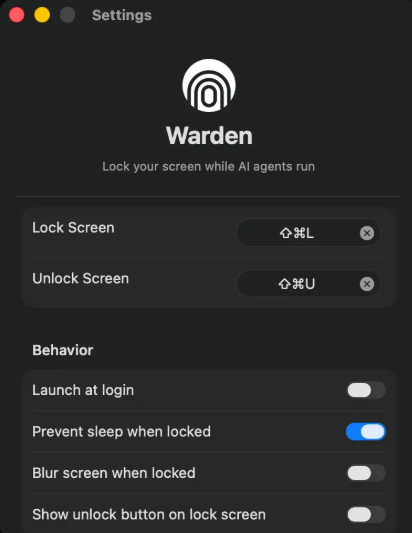
Press ⌘⇧L or trigger from the menu bar. Every input device locks instantly.
Protected
All keyboards, mice, and trackpads are blocked. Every screen is covered.
Unlock
Authenticate with Touch ID or your password. Your session resumes exactly where it was.
Complete input protection.
Not just app-level blocking.
Full Input Blocking
Intercepts every keystroke and click before any app can see it. No process, no script, nothing gets through.
Unlock with Touch ID
Place your finger to resume instantly. Password works too. Only you can bring your Mac back.
Every Screen Covered
All connected displays lock simultaneously. No gaps, no unprotected screens.
Keeps Your Mac Awake
Prevents your Mac from sleeping while locked. Long-running tasks keep running undisturbed.
Fully Offline
No internet connection, no account, no data collection. Everything runs locally on your Mac. Your input never leaves your device.
Notes:
If app won't open try Sentinel or resign.
Any other problems please comment/report.
Download
No comments yet. Be the first to share your thoughts!
Comments & Reviews